Porsche PCM 3.0 and 3.1 Problems: Cracked Screens, Failing Hard Drives, and What Actually Fixes Them
A look at why Porsche's PCM 3.0 and 3.1 head units run into trouble with age, and what can be repaired, upgraded, or added when they do.
September 22, 2026 · 4 min read
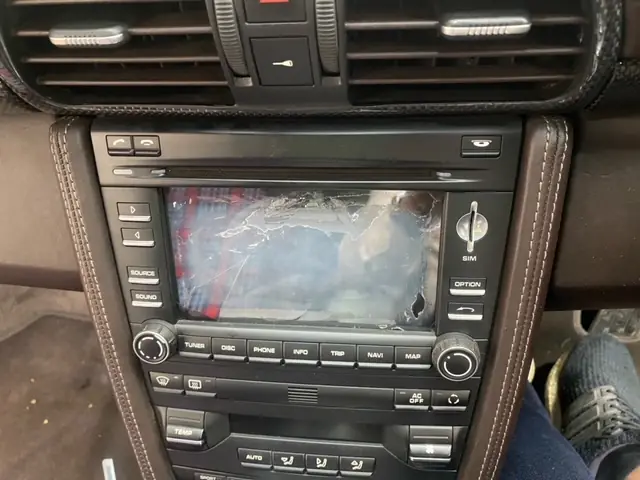
If you drive a Porsche from the PCM 3.0 or PCM 3.1 generation, roughly the mid 2000s through the early 2010s, you've probably noticed the touch screen or the navigation acting up before anything else in the car does. We see these units come through our shop in Saddle Brook, New Jersey every week, and the pattern is almost always the same: a cracked screen, a hard drive that's starting to give up, or both at once.
What PCM 3.0 and 3.1 Actually Are
PCM stands for Porsche Communication Management. It's the touch screen head unit that handles navigation, audio, phone pairing, and on some cars the rear camera display. PCM 3.0 and 3.1 were built around a resistive touch screen and a small mechanical hard drive, the same kind of spinning disk you'd have found in an early 2000s laptop. Both parts age the way you'd expect mechanical parts to age in a car that sits through heat, cold, and vibration for over a decade.
Why the Touch Screen Cracks
The screen itself is a glass and plastic sandwich bonded to a circuit layer underneath. Years of finger taps, dash heat, and the occasional bump from a key or a phone case slowly stress that bond. Once a hairline crack starts, it spreads, and eventually you get dead zones, double taps, or a screen that stops registering touch altogether while the display underneath still lights up fine. That's usually the first thing an owner notices, well before anything else in the unit starts acting up.
Signs Your Hard Drive Is Failing
The hard drive is the part that fails quietly. A few things tend to show up first:
- Navigation maps that take noticeably longer to load than they used to
- PCM taking an extra ten or fifteen seconds to boot after you start the car
- The system freezing mid route and needing a restart
- PCM that won't boot at all, stuck on a blank or frozen logo screen
None of that looks dramatic from the driver's seat at first, but it's the classic pattern of a mechanical drive nearing the end of its life. Once it fails completely, the unit can stop booting altogether, taking navigation, and sometimes audio and the rear camera feed, down with it.
The Hard Drive to SSD Upgrade
When we open a PCM 3.1 unit for a hard drive problem, the fix that actually holds up over time is replacing the mechanical drive with a solid state drive. An SSD has no moving parts, so it isn't subject to the same wear from heat and vibration, and it tends to boot the system noticeably faster than the original drive did even on day one. We wire it into the same PCM board and connectors, so everything else about the unit, buttons, screen, radio functions, works exactly as it did before. Call us at 201-773-0976 if you want to talk through whether your specific PCM version is a good candidate before you ship it in.
Adding CarPlay and a Reverse Camera
A lot of PCM 3.0 and 3.1 owners ask us whether they can add Apple CarPlay or a reverse camera to a unit that never shipped with either. On these generations, both can be integrated into the existing PCM hardware, so you keep the factory look on the dash instead of bolting on an aftermarket screen. The camera addition is especially popular on cars that never came with rear parking assistance from the factory, since it's a genuinely useful upgrade that doesn't change how the interior looks or feels.
Once a PCM 3.0 or 3.1 unit starts failing, a lot of owners assume the only option is finding a used replacement online and hoping it works. That approach comes with its own risks. A used PCM pulled from another car is usually just as old as the one you're replacing, so you're often buying someone else's hard drive problem before it's shown up yet, and there's no way to know how it was stored or handled before it was pulled. Repairing the unit you already have, or upgrading it while it's open, avoids that gamble entirely. You already know the history of your own car, and once we've replaced the drive with an SSD, you're not relying on the luck of a used part lasting as long as the original one did. It also keeps the dash exactly as it left the factory, which matters to a lot of the Porsche owners we work with. An aftermarket touch screen unit might add a few extra features, but it changes how the interior looks and feels every time you sit in the car, and it's not something you can easily undo without another install down the road. Repairing or upgrading the original PCM keeps that decision off the table entirely.
Turnaround, Shipping, and Warranty
Most PCM repairs and upgrades take 7 to 10 business days once the unit reaches our shop. We accept units shipped from anywhere in the country or internationally, and every incoming unit needs a completed repair form so we know exactly what you'd like done. Repairs carry our standard 1-year limited warranty. If you're not local to Saddle Brook, shipping the unit in is how most of our Porsche customers already work with us, and it's a routine part of what we do every week.
Becker Auto Sound LLC, 201-773-0976
Call 201-773-0976More articles
Bluetooth in a Classic Becker Radio: How to Add It Without Losing the Original Look
How we wire Bluetooth streaming into a classic Becker or Mercedes-Benz radio without changing a single thing you can see on the dash.
How to Ship a Car Radio, Amplifier, or Antenna for Repair
A practical guide to packing and shipping a car radio, amplifier, or antenna to us for repair, so it arrives in the same shape it left in.